+ - 0:00:00
Notes for current slide
Notes for next slide

Session 7

More Rmarkdown

1

Typography

Text can be bold, italic, strikethrough, or inline code.

*italic*
**bold**
~~strikethrough~~
`inline code`
[link](https://example.com)
2

Code Blocks

R Code

ggplot(gapminder) +
aes(x = gdpPercap, y = lifeExp, size = pop, color = country) +
geom_point() +
facet_wrap(~year)
3

Tables

knitr::kable(head(mtcars), format = 'html')
mpg cyl disp hp drat wt qsec vs am gear carb
Mazda RX4 21.0 6 160 110 3.90 2.620 16.46 0 1 4 4
Mazda RX4 Wag 21.0 6 160 110 3.90 2.875 17.02 0 1 4 4
Datsun 710 22.8 4 108 93 3.85 2.320 18.61 1 1 4 1
Hornet 4 Drive 21.4 6 258 110 3.08 3.215 19.44 1 0 3 1
Hornet Sportabout 18.7 8 360 175 3.15 3.440 17.02 0 0 3 2
Valiant 18.1 6 225 105 2.76 3.460 20.22 1 0 3 1
4
DT::datatable(head(mtcars), fillContainer = FALSE, options = list(pageLength = 4))
5

Here is an unordered list:

  • Item foo
  • Item bar
  • Item baz
  • Item zip

The markdown is:

* Item foo
* Item bar
6

And an ordered list:

1. Item one
1. Item two
1. Item three
1. Item four

And an ordered list:

  1. Item one
  2. Item two
  3. Item three
  4. Item four
7

And a nested list:

  • level 1 item
    • level 2 item
    • level 2 item
    • level 3 item
    • level 3 item
  • level 1 item
    • level 2 item
    • level 2 item
    • level 2 item
  • level 1 item
    • level 2 item
    • level 2 item
  • level 1 item
8

Nesting an ol in ul in an ol

  • level 1 item (ul)
    1. level 2 item (ol)
    2. level 2 item (ol)
    • level 3 item (ul)
    • level 3 item (ul)
  • level 1 item (ul)
    1. level 2 item (ol)
    2. level 2 item (ol)
    • level 3 item (ul)
    • level 3 item (ul)
    1. level 4 item (ol)
    2. level 4 item (ol)
    • level 3 item (ul)
    • level 3 item (ul)
  • level 1 item (ul)
9

Images

img

10

Data Visualization

  • ggplot is great for fast exploratory plots.
  • It has great tools for creating plots for communicating your results.
  • In this scenario, the emphasis should be on the story you are trying to tell.
11

Themes

12

Default theme

  • Is called theme_grey()
ggplot(diff_df, aes(x = pts_diff, y = win_pct)) +
geom_point() +
theme_grey()
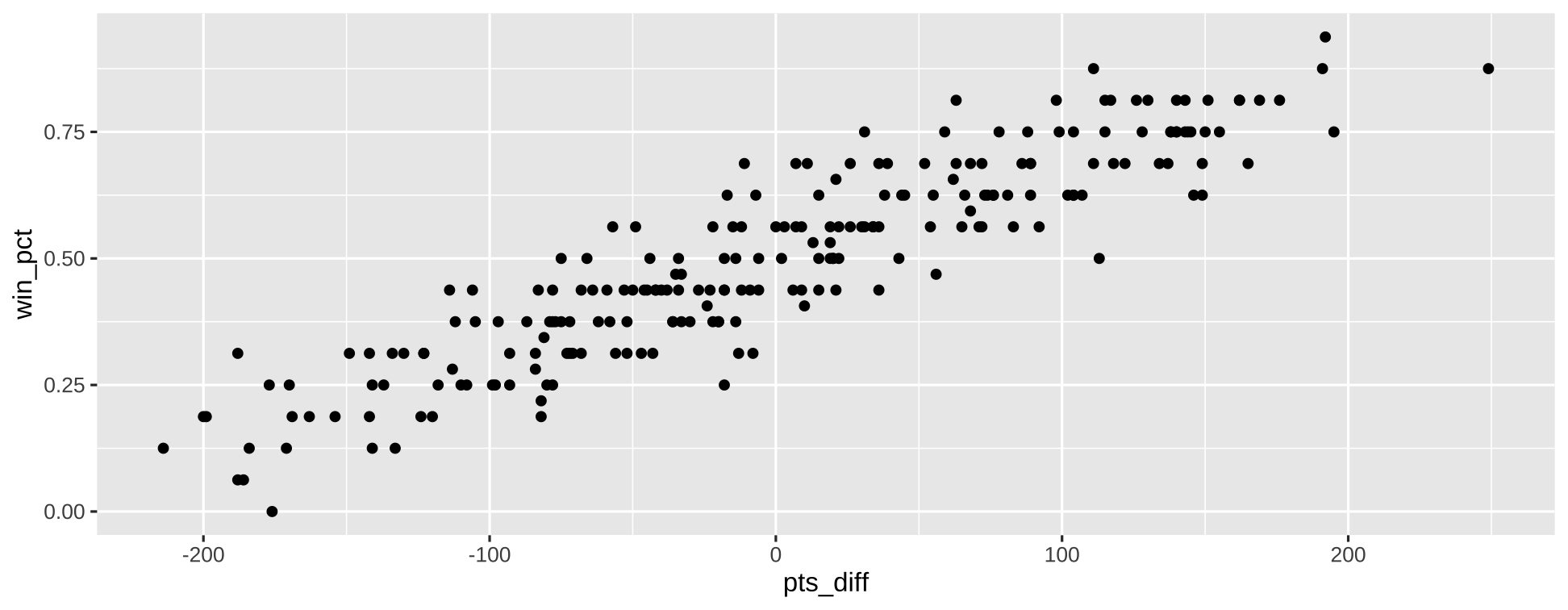
  • Grey panel background
  • white grid lines
13

GGthemes

  • package with some well known themes:
    • theme_fivethirtyeight()
    • theme_economist()
14

Theme elements

  • theme elements can be lines, text, etc.
  • To specify an option, you use the corresponding element.
15

Centering titles and subtitles

  • When styling text, use element_text.
theme(
plot.title=element_text(hjust=.5)
)
16

Grids

  • When styling lines, use element_line
theme(
panel.grid.major=element_line(color="red")
)
17

Labels

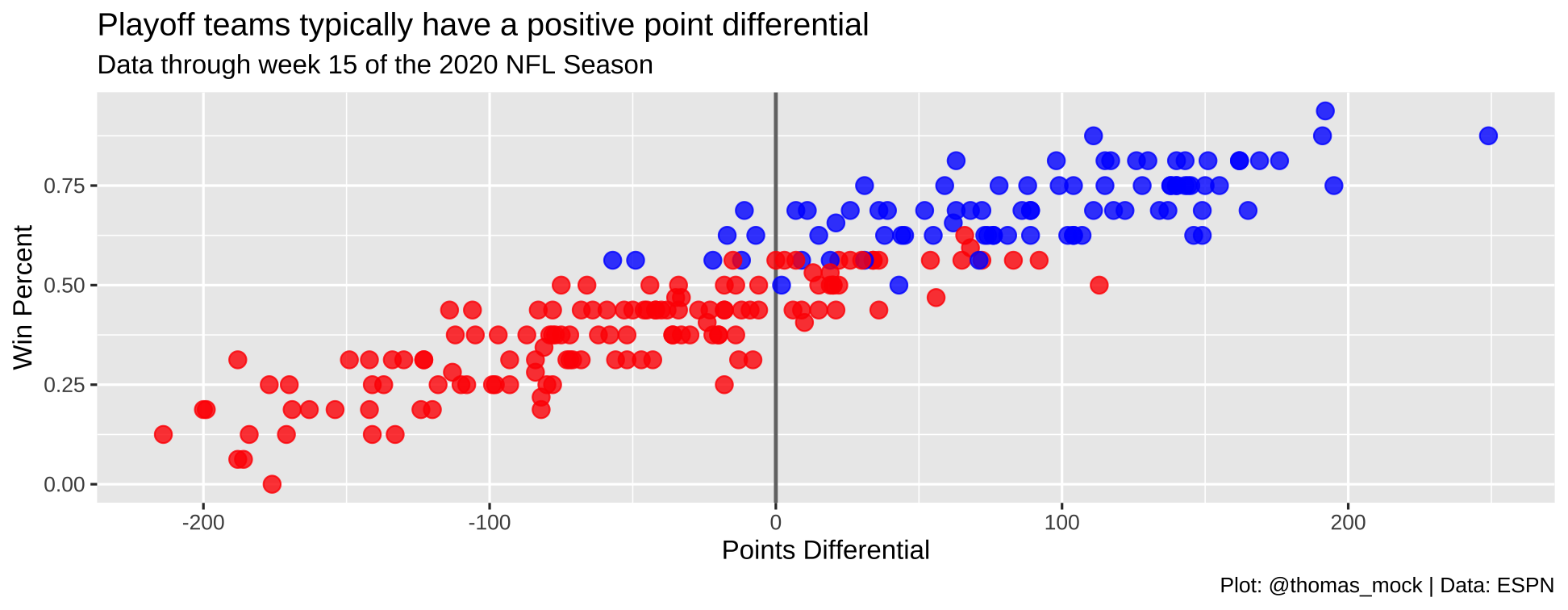
plot <- nfl_stand %>%
mutate(
color = case_when(
season < 2020 & seed <= 6 ~ "blue",
season == 2020 & seed <= 7 ~ "blue",
TRUE ~ "red"
)
) %>%
ggplot(aes(x = as.numeric(pts_diff), y = win_pct)) +
geom_vline(xintercept = 0, size = 0.75, color = "#737373") +
geom_point(
aes(color = color),
size = 3, alpha = 0.8
) +
scale_color_identity() +
labs(x = "Points Differential", y = "Win Percent",
title = "Playoff teams typically have a positive point differential",
subtitle = "Data through week 15 of the 2020 NFL Season",
caption = "Plot: @thomas_mock | Data: ESPN")
18
plot

19

Scales

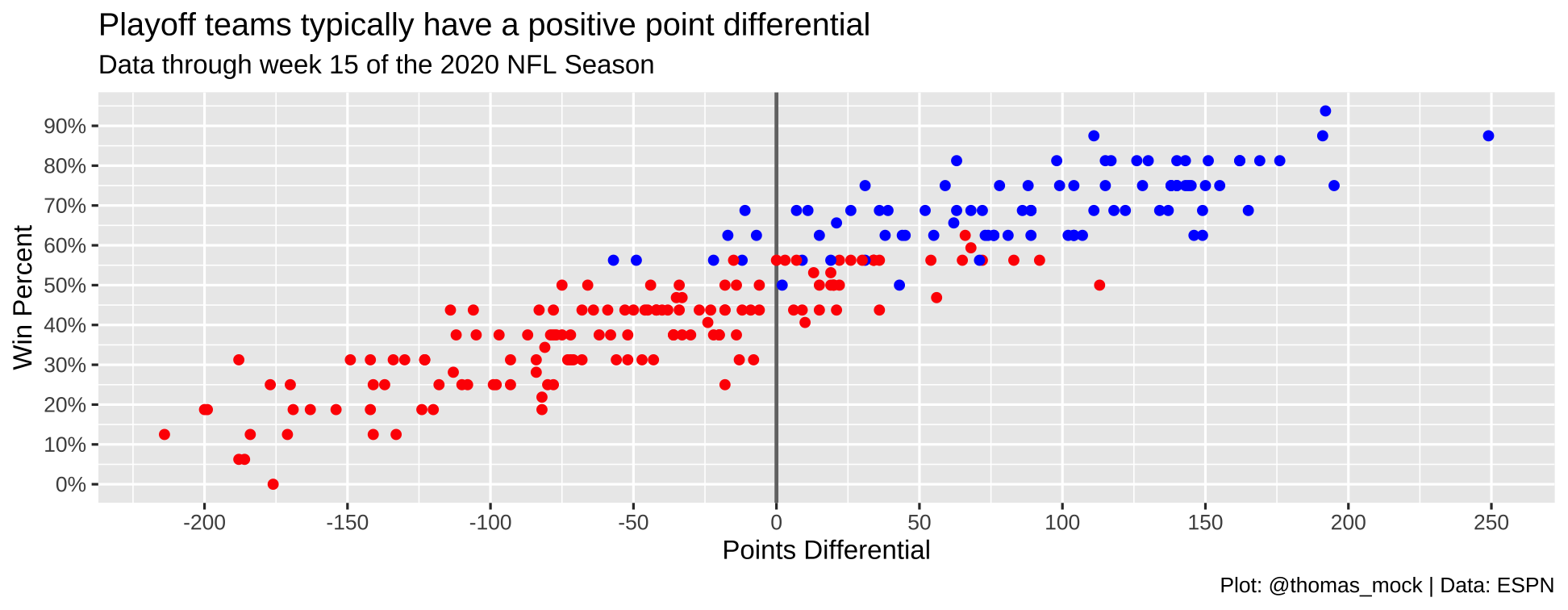
plt_scales <- nfl_stand %>%
mutate(
color = case_when(
season < 2020 & seed <= 6 ~ "blue",
season == 2020 & seed <= 7 ~ "blue",
TRUE ~ "red"
)
) %>%
ggplot(aes(x = as.numeric(pts_diff), y = win_pct)) +
geom_vline(xintercept = 0, size = 0.75, color = "#737373") +
geom_point(aes(color=color)) +
scale_color_identity()+
scale_y_continuous(
labels = scales::percent_format(accuracy = 1),
breaks = seq(.0, 1, by = .10)
) +
scale_x_continuous(
breaks = seq(-200, 250, by = 50)
) +
labs(x = "Points Differential", y = "Win Percent",
title = "Playoff teams typically have a positive point differential",
subtitle = "Data through week 15 of the 2020 NFL Season",
caption = "Plot: @thomas_mock | Data: ESPN")
20
plt_scales

21

Experiment with themes

plot + ggthemes::theme_economist()
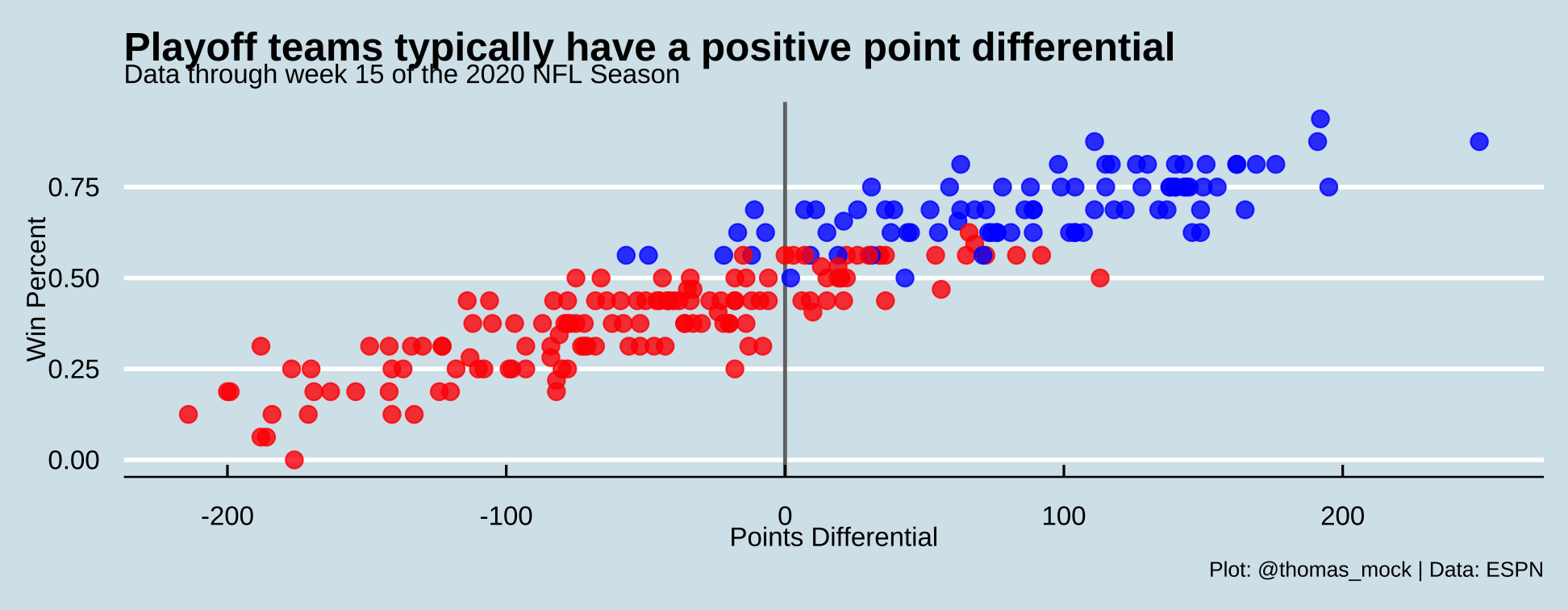
Final plot

library(ggtext)
playoff_label_scatter <- tibble(
pts_diff = c(25,-125), y = c(0.3, 0.8),
label = c("Missed<br>Playoffs", "Made<br>Playoffs"),
color = c("#D50A0A", "#013369")
)
playoff_diff_plot <- nfl_stand %>%
mutate(
pts_diff=as.numeric(pts_diff),
color = case_when(
season < 2020 & seed <= 6 ~ "#013369",
season == 2020 & seed <= 7 ~ "#013369",
TRUE ~ "#D50A0A"
)
) %>%
ggplot(aes(x = pts_diff, y = win_pct)) +
geom_vline(xintercept = 0, size = 0.75, color = "#737373") +
geom_hline(yintercept = 0, size = 0.75, color = "#737373") +
geom_point(
aes(color = color),
size = 3, alpha = 0.8
) +
# ggtext::geom_richtext(
# data = playoff_label_scatter,
# aes(x = pts_diff, y = y, label = label, color = color),
# fill = "#f0f0f0", label.color = NA, # remove background and outline
# label.padding = grid::unit(rep(0, 4), "pt"), # remove padding
# family = "Chivo", hjust = 0.1, fontface = "bold",
# size = 8
# ) +
scale_color_identity() +
labs(x = "Points Differential", y = "Win Percent",
title = "Playoff teams typically have a positive point differential",
subtitle = "Data through week 15 of the 2020 NFL Season",
caption = str_to_upper("Plot: @thomas_mock | Data: ESPN")) +
scale_y_continuous(
labels = scales::percent_format(accuracy = 1),
breaks = seq(.0, 1, by = .10)
) +
scale_x_continuous(
breaks = seq(-200, 250, by = 50)
) +
theme(plot.subtitle=element_text(hjust=.5))
22

Typography

Text can be bold, italic, strikethrough, or inline code.

*italic*
**bold**
~~strikethrough~~
`inline code`
[link](https://example.com)
2
Paused

Help

Keyboard shortcuts

, , Pg Up, k Go to previous slide
, , Pg Dn, Space, j Go to next slide
Home Go to first slide
End Go to last slide
Number + Return Go to specific slide
b / m / f Toggle blackout / mirrored / fullscreen mode
c Clone slideshow
p Toggle presenter mode
t Restart the presentation timer
?, h Toggle this help
Esc Back to slideshow